


Description
CISCO-ISR4351/K9/K9 Overview
Cisco 4351 Integrated Services Router, which supports 3 Network Interface Modules (NIM) slots, delivers 200 Mbps to 400 Mbps aggregate throughput. The Cisco C1-CISCO4351/K9 is the 4351 Cisco ONE Software Bundle.
Quick Spec
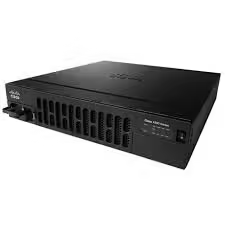
Figure 1 shows the appearance of C1-CISCO4351/K9.
Table 1 shows the quick spec.
| Product Number | C1-CISCO4351/K9 |
| Product Description | Cisco ONE ISR 4351 (3GE.3NIM.2SM.4G FLASH.4G DRAM.IPB) |
|
Aggregate Throughput |
200 Mbps to 400 Mbps |
|
Total onboard WAN or LAN 10/100/1000 ports |
3 |
|
RJ-45-based ports |
3 |
|
SFP-based ports |
3 |
|
NIM slots |
3 |
|
OIR (all I/O modules) |
Yes |
|
Onboard ISC slot |
1 |
|
Default flash memory |
4 GB |
|
Maximum flash memory |
16 GB |
Product Details
Figure 2 shows the LEDs on the front panel of the Cisco ISR4351/K9 for reference. C1-CISCO4351/K9 is similar with it.

Note:
|
① |
Power supply unit |
③ |
Router power On/Off switch |
|
② |
Router fan tray |
④ |
LEDs |
·The router fan tray is hidden behind the removable bezel.
·LEDs include ten indicators.
Table 2 shows the LED descriptions.
|
LEDs |
Represents |
Color |
Description |
|
PSU0 |
Power Supply Unit (P0 and P1) Status |
Green |
PSU is on and is providing power. |
|
Amber |
PSU is on but with errors or in a failure condition. |
||
|
Off |
Power supply is turned off. |
||
|
POE0 |
POE PSU |
Green |
PoE is on and providing power. |
|
Amber |
PoE is in a failed condition. |
||
|
Off |
PoE supply is not present. |
||
|
GE POE |
Internal PoE Daughter Card Status |
Green |
PSU is installed and providing power |
|
Amber |
PSU is installed but in a failure condition. |
||
|
Off |
PSU is off. |
||
|
FLASH |
System Flash Status |
Blinking Green |
Compact flash/eUSB flash is present and currently being accessed. |
|
TEMP |
Temperature Status |
Solid green |
All temperature sensors in the system are within acceptable range. |
|
Amber |
One or more temperature sensors in the system are outside the acceptable range. |
||
|
Off |
Temperature is not being monitored. |
||
|
PWR |
System Power |
Green |
System power is on and functioning correctly. |
|
Green blinking |
System power is in the process of shutting down. |
||
|
Amber |
System power is up, but low level initialization failed. |
||
|
Amber blinking |
System power is up, but the system failed to come out of reset. |
||
|
Off |
System power is off. |
||
|
SSD |
mSATA Slot Status |
Green |
SSD mSATA is present and enabled. |
|
Amber |
Initialized with error. |
||
|
Off |
Not present. |
||
|
ISC |
ISC Slot Status |
Green |
PVDM4 is present and enabled. |
|
Amber |
Initialized with error. |
||
|
Off |
Not present. |
||
|
FAN |
Fan Status |
Green |
All fans are operating. |
|
Amber |
One fan has stopped working. |
||
|
Blinking Amber |
Two or more fans have stopped working, or the fan tray has been removed. |
||
|
Off |
Fans are not being monitored. |
||
|
STAT |
System Status |
Solid green |
System operating normally. |
|
Blinking amber |
BIOS/Rommon is booting. |
||
|
Amber |
BIOS/Rommon has completed booting, and system is at Rommon prompt or booting platform software. |
||
|
Off |
System is not out of reset or BIOS image is not loadable. |


Reviews
There are no reviews yet.